
A real-world technology integration project focused on simplicity, performance, and value
Modern businesses need meeting rooms that make collaboration simple. Video calls, presentations, screen sharing, and hybrid meetings have become part of everyday business – but building a professional meeting room does not necessarily mean spending tens of thousands of dollars.
As a home automation and technology integration company, we look at meeting spaces the same way we look at any smart environment: the technology should work together seamlessly, while the experience for the person using it should remain simple.
We recently put that idea to the test. Our goal was straightforward: create a reliable, professional meeting-room experience using proven AV technology while keeping the total investment, including hardware and labor, under $5,000*.
The result was a compact, cost-effective solution built around Barco ClickShare and a Logitech MeetUp system.
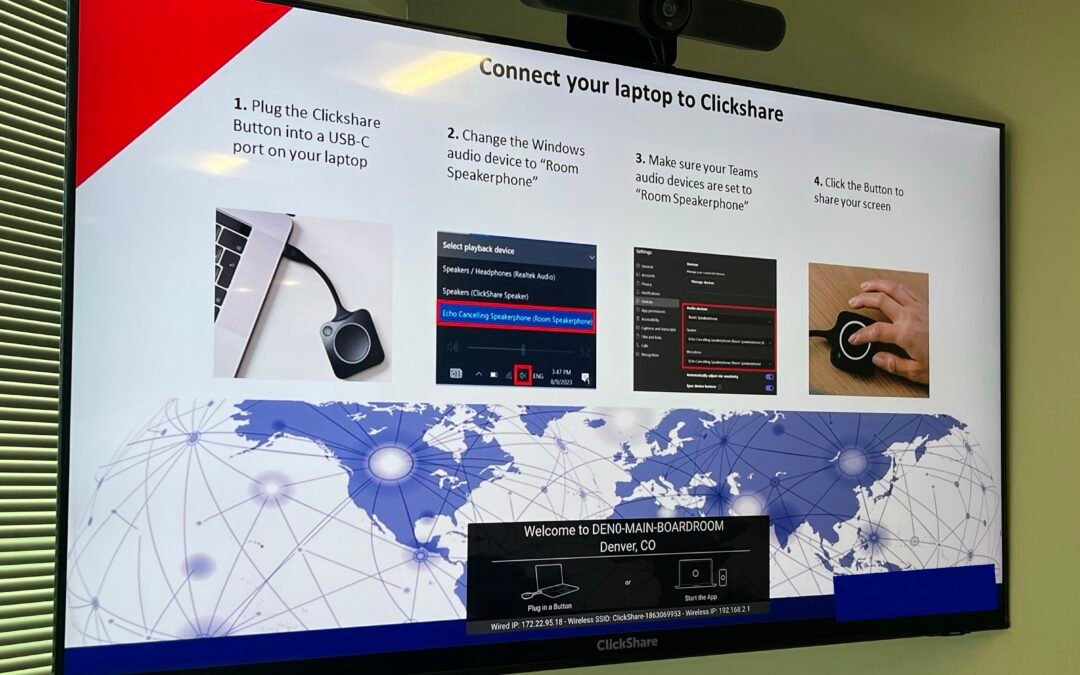
Completed meeting-room installation with the display, camera, and ClickShare experience.
The Challenge: A Professional Experience Without the Professional Price Tag
A meeting room can quickly become complicated. A typical setup may require a display, camera, microphones, speakers, a computer, cables, adapters, and software – followed by installation and configuration to make everything work together.
The biggest challenge is often not buying the individual components. It is making sure the entire system is simple enough that anyone can walk into the room and use it.
We wanted to avoid a setup where employees had to spend several minutes figuring out which cable to use, where to connect a laptop, which microphone to select, how to get a presentation onto the display, or why the camera or audio was not working.
Instead, we designed the room around a much simpler concept: Connect. Share. Meet.
The Solution
We combined three primary technology components to create the core meeting-room experience:
1. Barco ClickShare NX-20
Barco ClickShare provides a straightforward way for users to connect their laptops and share content to the room display. Rather than relying on a collection of adapters and presentation cables, the system gives users a consistent way to bring their content onto the screen.
This is especially useful when different employees, clients, or guests bring different laptops into the room.
2. Barco USB-C ClickShare Button
The USB-C ClickShare button provides a simple physical connection point for users. Instead of searching for the correct video cable or adapter, the user connects the button to a compatible USB-C port on the laptop and can share content to the meeting-room display.
We also configured the system so the room’s audio devices can be selected when using applications such as Microsoft Teams.
3. Logitech MeetUp
For video and audio, we used the Logitech MeetUp system, providing an integrated camera, microphone, and speaker solution for the room.
Keeping these functions together helps reduce equipment clutter and creates a cleaner experience at the front of the room. Participants get the essential tools needed for video conferencing without filling the conference table with separate cameras, speakers, and microphones.
Designed for Ease of Use
Technology is only useful when people can actually use it. One of the most important parts of this installation was making the user experience simple.
When someone enters the room, the process is straightforward:
The User Workflow
- Connect theClickSharebutton – Plug the USB-C ClickShare button into the laptop.
- Select the room audio-Select the configured room speakerphone as the Windows audio device.
- Configure the meeting application-Make sure Microsoft Teams is using the room’s speakerphone/audio device.
- Share the screen-Press the ClickShare button to share the laptop screen to the room display.
The instructions are displayed directly on the screen, so users do not have to remember a complicated process or contact IT every time they need to present.
The Installation Matters Too
A good meeting-room system is not just about the equipment. The installation itself plays an important role in how the finished room looks, feels, and functions.
We mounted the display and camera together at the front of the room while routing the required connections behind the display. This keeps the primary equipment organized and minimizes visible wiring from the user-facing side.
As a home automation and technology integration company, this is an important part of our approach. We do not simply install individual devices – we consider how the technology works together within the space, how people will interact with it, and how the system can be maintained over time.
A Clean Tabletop Experience
The meeting table should remain a workspace, not become a technology workstation.
The ClickShare button and remote are readily accessible, while the primary video and audio equipment stays positioned at the front of the room. This keeps the meeting space usable while still giving participants the controls they need.
The Cost Advantage
This was one of the most important parts of the project. Our objective was to demonstrate that a professional meeting-room experience can be achieved without an excessive AV budget.
By combining Barco ClickShare NX-20, a Barco USB-C ClickShare button, Logitech MeetUp, display and mounting hardware, cabling, installation, configuration, testing, and labor, we were able to create the complete solution for under $5,000*.
That makes this approach particularly attractive for small and mid-sized businesses that want a better meeting experience without investing in a large, complex AV system.
Smart Technology Does Not Have to Mean Complicated Technology
When people hear “smart meeting room,” they may imagine an expensive room filled with sophisticated control systems. But smart technology is not necessarily about adding more equipment.
Sometimes, smart means making the technology easier to use.
In this room, the user does not need to understand how the system is wired or how the devices communicate with each other. They simply connect their laptop, select the room audio, and share.
That is the kind of experience we aim to create through technology integration: complexity behind the scenes, simplicity for the user.
More Than a Meeting Room: A Technology Integration Approach
Our work on this project reflects a broader philosophy we bring to technology integration. Whether we are working with a home, office, conference room, or smart workspace, the goal is not to add technology for the sake of technology.
The goal is to create an environment where the technology supports the people using the space.
A successful smart environment should feel natural. Devices should work together, controls should be intuitive, and the finished installation should complement the space rather than overwhelm it.
That is where an experienced integrator can make a difference — from selecting the right hardware to designing the user experience, completing the installation, configuring the system, and testing the finished solution.
Is This the Right Solution for Your Meeting Room?
This type of setup can be a strong fit for:
- Small and medium-sized conference rooms
- Executive meeting rooms and boardrooms
- Hybrid-work environments
- Businesses using Microsoft Teams
- Companies upgrading from basic TV-and-webcam setups
- Organizations looking for a professional solution without a large AV investment
It can also serve as a practical starting point for businesses that may want to expand their room automation and technology integration in the future.
Our Takeaway
This installation demonstrated something we believe is important: you do not always need a $10,000+ AV system to create a professional meeting room.
With the right combination of hardware, thoughtful installation, and proper configuration, it is possible to build a meeting space that is easy to use, professional, reliable, and cost-effective.
Our Barco ClickShare and Logitech MeetUp solution gave this room a simple workflow for presenting and video conferencing while keeping the overall hardware and labor investment under $5,000*.
At the end of the day, the best technology is the technology people do not have to think about.
Walk in. Connect. Share. Meet.
Behind the Scenes: A Thoughtful Installation
Equipment and cabling organized behind the wall-mounted display.
Pricing Note
* The stated under-$5,000 investment is based on this specific installation and the hardware, labor, and scope involved. Final pricing may vary depending on room size, display requirements, mounting, cabling, networking, configuration, and other project-specific requirements.
Ready to create a smarter, simpler meeting space? Our technology integration approach can help you design a solution around your room, your workflow, and your budget.
Recent Comments